PDF: Editorials

2. Title
2.1. Check that title is in sentence case.
2.2. Check title spelling.
2.3. Check that title is written in blue and bold font. Note: title of editorials is written in smaller font than title of research papers.
2.4. Check that capitalization of scientific terms is correct. We suggest you use the following procedure if you are in doubt regarding this or that term.
2.5. Check Latin terms:
The following Latin terms should be formatted in italics: ex vivo, in silico, in situ, in vitro, in vivo.
et al, etc, and via should be formatted in plain text.
Plain text is acceptable for all other Latin terms not noted above.
2.6. Check that species and gene names are written in italics.
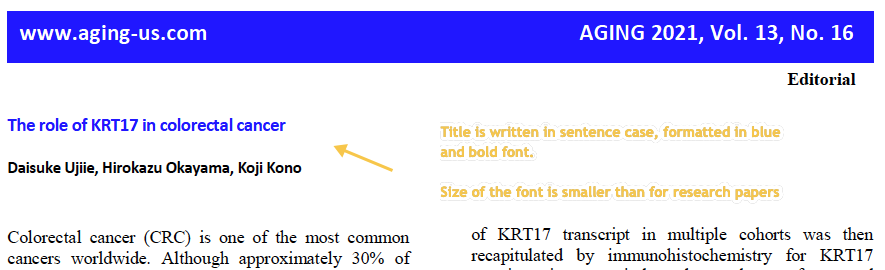
3. Author List
Note
The number of authors is limited to three for editorials.
3.1. Check that author list contains full names of authors divided by comma (,). If there are only 2 authors, then check that they are divided by “and” word.
3.2. Check that author names are written in black and bold font.
3.3. Check that author’s name does NOT contain titles and/or degrees (e.g. Dr., Ph.D., M.D., etc.).
3.4. Check that there is no punctuation mark at the end of author list.
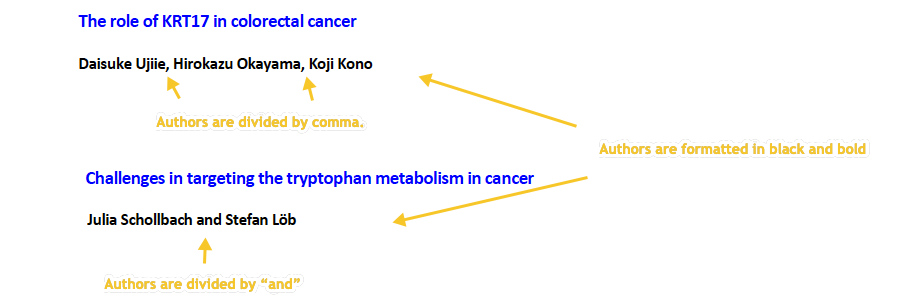
3.5. Check the format of the author name.
Allowed formats:
FirstName LastName
FirstName MiddleName LastName
FirstName MiddleName MiddleName LastName (there can any number of middle names)
FirstName M. LastName (M. is initial of middle name; up to 4 letters; period should be used after each initial)
FirstName M.N. LastName (M.N. are initials of middle names; up to 4 letters; period should be used after each initial)
F. MiddleName LastName (F. is an initial of first name)
F. MiddleName MiddleName LastName (F. is initial of first name and there can any number of middle names)
Important
As a general rule, we don’t want to keep initials for first names. Request the expanded name from the author in this situation. If the authors insist on a first initial, then the middle name(s) must be present and fully expanded.
LastName cannot be presented as initial (even if authors insist on this). LastName should always be presented in full.
Please note that last names can be compound, can have prepositions, suffixes, prefixes or be mononyms. For example:
Compound last names: Garcia-Closas, Gomez Jimenez
Last name related prepositions: Van den Brandt, van der Ent
Suffixes: Williams 3rd, Rowland Jr
Prefixes: McCann, O’Kelly
Mononym: Govindjee
If you see that author name does not comply to these standards or you have a doubt about a name, please contact corresponding author and ask to provide author name in correct format. (PubMed can be used as a resource to clarify doubts about author names, but this method should only be used if the author’s name can be found to appear in one consistent way. Still check with author before making changes other than adding periods after initials.)
3.6. Check that author names do not have affiliation numbers.
3.7. Check that there are no affiliations listed for authors (there must be no affiliations on the page).
4. Text
4.1. Check that font type and size is consistent throughout the body of the article.
4.2. Check all website addresses in article text:
Check with author about nonworking links (see exceptions here). They can choose to replace or remove them. If an author requests to remove a link, then the name of the resource (software, database, tool, etc.) should be/remain present. In cases where the name of the resource is the same as the website URL (ex: MicroRNA.org), the protocol (https:// or http://), “www.” and any other excess information should be removed from the URL, and the remaining resource/website name should no longer be kept as an active link (ex: “http://www.microrna.org/microrna/home.do” would be changed to “MicroRNA.org”).
4.3. Check Latin terms (this applies to all text except References):
The following Latin terms should be formatted in italics: ex vivo, in silico, in situ, in vitro, in vivo.
et al, etc, and via should be formatted in plain text.
Plain text is acceptable for all other Latin terms not noted above.
A period should follow “et al”: et al.
4.4. British and American English spelling are both acceptable; however, consistency should be maintained.
5. Figure
Note
Only one figure should be used for editorials.
Any additions or changes outside of spelling, grammar or resolution to the figure need approval from Olga or Elena before implementation.
5.1. Check that figure image has text and graphics which are clear and large enough to read.
If image is hard to read, please contact Production team and ask to provide clearer images. If Production team does not have better images, then contact corresponding author.
5.2. Check whether figures have panel letters.
A panel letter is not required in the case where there is only one image, or panel.
Both lowercase and uppercase panel letters are allowed; however, they should be used consistently in the figure.
Lowercase and uppercase subpanel letters as well as numbers are allowed; however, they should be used consistently in the figure. (Ex. Aa, Ba… OR AA, BA… OR A1, B1). Subpanels are not mandatory.
5.3. Check the figure description text (figure legend):
Check that figure legend has a figure number:
Figure N. (where “N” is a number of the figure)
Check that number is followed by period (.).
Check that figure number is formatted in bold and colored in black.
If figure number is followed by text, then check that the first sentence of that text is formatted in bold and colored in black. The rest of the text should be in plain text.
Figure 1. First sentence of legend text in sentence case. Second sentence and rest of text.
Exclusion: if first sentence contains panel letters, then it should be formatted in plain text.
Figure 1. First sentence of legend text containing panel letter (A) and letter (B) in a sentence case. Second sentence and rest of text.
If figure image has panel letters, then check that reference to each panel is present in figure legend. Reference is denoted by panel letter and is formatted in bold. Subpanels are allowed (Ex. Aa, Ab, Ac, etc.) but do not require individual callouts in the legend or text.
If a reference to panel letter is missing, then please ask author to provide one.
Check that every panel letter callout is formatted in bold font.
Check that at least the first instance of each panel letter is enclosed in parentheses. Subsequent callouts of the same panel letter can be enclosed in parentheses, but this is not mandatory.
Check with author about rearranging panels/callouts if called out of order. If author has logical reason for keeping as-is, please seek approval from Olga while copying Christopher.
Check that the case of each panel letter callout matches case of the panel letter used in the image. Uppercase or lowercase is fine as long as only one case is consistently used in the figure.
Check that the first instance of each panel letter is called out in alphabetical order (Ex. A, B, A, C, B, D).
Panel letters can be combined in different ways in the figure legend text (The same variations are allowed for lowercase panel letters):
(A and B) (A, B)
 (A–C)
(A–C)
5.4. Check figure callouts in the text:
Check the format of figure callouts (no other variations allowed):
Figure 1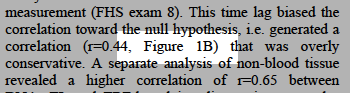
If figure has panels, then callout can have a letter (letter case should be the same as on figure image):
Figure 1AFigure 1a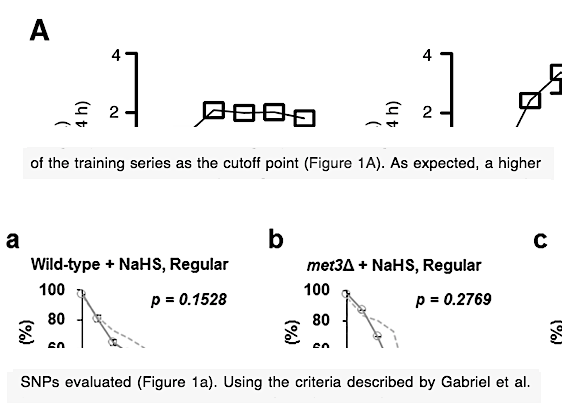 Examples of callout combinations:Figure 1Figure 1CFigure 1B and 1C (note that there is no “s” at the end of “Figure” word)Figure 1B, 1CFigure 1E–1G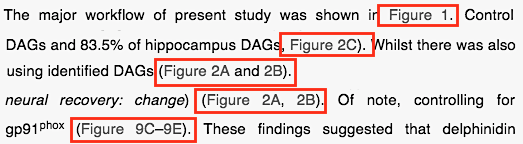
Check that the word “Figure” as well as number (and letter) are hyperlinked.
Check that each figure has at least 1 callout in the text.
If callout is missing, please contact author.
7. Reference Callouts
7.1. Check reference callouts in the text:
Check the format of reference callouts:
[N] (where “N” is the order number of the corresponding reference)Examples:[1][1, 2][1–3][1, 3–4]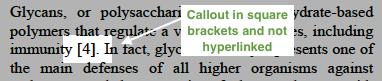
Check that only comma (,) and en dash (–) are used as a separators. No other separators are allowed.
Check that there is a space after comma (,) and no space before and after en dash (–).
Check that reference callouts are in plain text and not hyperlinked.
7.2. Check that callout number for each of the references is present in the text or is covered in the range of numbers. i.e. in the range of [1–3] reference 2 is not present in the text, but covered in the range. This case is acceptable.
Callouts can be found in text and figures.
7.3. Check that there are no callouts for non-existing references (i.e. there is a callout, but there is no reference).
7.4. Check that there are no references for which callouts are missing (i.e. there is a reference, but there is no callout for it).
7.5. Check that reference callouts appear in linear order throughout the manuscript. 1, 2, 3 and so on. Once a reference has initially been called out, it can be called out again in any order. For example, 1, 2, 3, 1, 2, 4 is OK.
If one or more references or callouts are missing or are being called out of linear order in the text, please contact author.
8. References
Note
Maximum allowed number of references is 8.
References in editorials do not have article title component.
Font of the references differs from rest of the article. This is OK.
8.1. Author List
8.1.1. Check that author names in the list of authors are in-line with the following format:
LastName INITIALS optional Suffix (e.g. Sr, Jr, 2nd, 3rd, 4th)
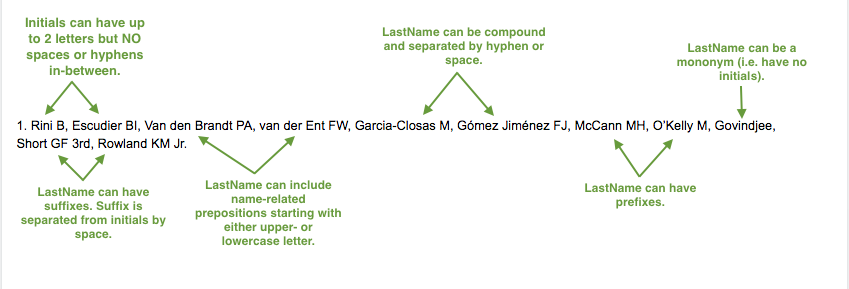
8.1.2. Check author initials:
No more than 3 initials allowed.
Allow the number of initials author has supplied if different from PubMed and/or original article (within the 3 initial limit).
NO hyphens or spaces allowed in-between initials.
8.1.3. Check that all mononyms (names which have no initials) are “true” mononyms (check PubMed site).
8.1.4. Remove any electronic addresses (Ex. Electronic address: easloffice@easloffice.eu).
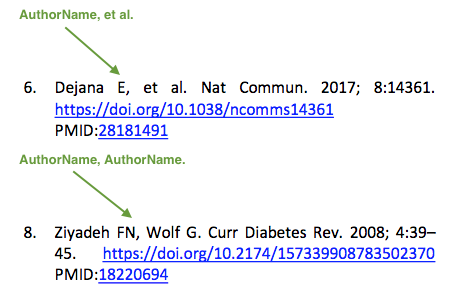
8.1.5. Check that list of authors contains either of the following:
One author name followed by comma (,) and “et al.”
Two author names divided by comma (,) and followed by period (.)
8.3. Citation-Data (in-house)
Attention
- This section is applicable ONLY to in-house journals:
Oncotarget, Oncoscience, Aging (Albany NY), Genes Cancer.
Citation data is a part of a reference, which contains journal title, year, volume, pages, doi and PubMed link.
8.3.1. Check that citation data has correct journal title. The following titles are allowed:
OncotargetOncoscienceAging (Albany NY)Genes CancerThis is the only acceptable spelling. No variations are allowed.
8.3.2. Check that journal citation-data has the following elements in this order:
JournalTitle. year; volume: pages. DOI [PubMed]
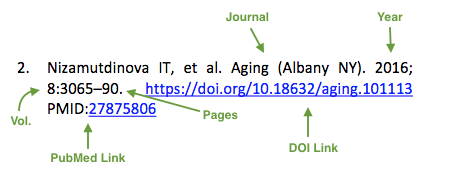
Journal title should be followed by period (.) There should be a space after period.
Year should be presented in full (4 digits) and should be followed by semicolon (;). There should be a space after semicolon.
Volume should be followed by colon (:). There can be a space after colon (but this is not mandatory).
Page numbers must be written in shortened format (12063-74) and followed by a period (.). There should be a space after period. Occasionally, there are cases where a reference may only have one page number, which is fine.
DOI must be present and in “https://doi.org” format. It should be highlighted in blue and should be an active link leading to the correct article page. There must be no period at the end. Alphabetical letters that appear in DOI numbers can be in uppercase, lowercase or a mixture of both cases (this excludes the “https://doi.org” URL).
“[PubMed]” link must be present (when available) and must be presented as “PMID:” word followed by hyperlinked PMID number.
“PMID:” word must be written in ALL CAPS and formatted as plain text (no special formatting) and has a colon (:) at the end.
PMID number must be hyperlinked to the article on PubMed website.
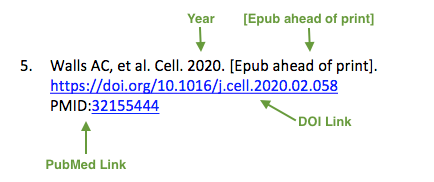
8.3.3. There can be references to the articles which have been published “ahead of print”. The format of citation data for such articles is as follows: JournalTitle. year. [Epub ahead of print]. DOI [PubMed]
Check that there is a period (.) after year followed by a space.
Check that there is a period (.) after “[Epub ahead of print]” followed by a space.
Check that “[Epub ahead of print]” appears after year and before DOI.
If you come across an Epub reference, be sure to verify whether publishing information has since been released. If publishing information is available, then please add vol, pg numbers, etc. and format as directed above in section 8.3.2.
8.4. Citation-Data (other journals)
Attention
This section is applicable to all journals except for in-house journals.
Citation data is a part of a reference, which contains journal title, year, volume, pages, doi and PubMed link.
8.4.1. Check that journal citation-data has the following elements in this order:
JournalTitle. year; volume: pages. DOI [PubMed]
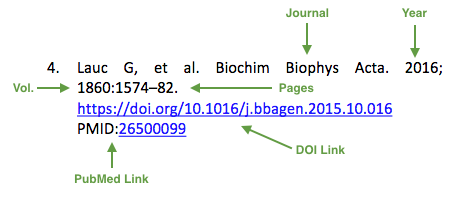
- Journal title should be followed by period (.) There should be a space after period.
Journal title can be abbreviated or written in full. If abbreviated, check that it is written the same way as on PubMed site. You can look up journal titles here: https://www.ncbi.nlm.nih.gov/nlmcatalog/journals.
If both full and abbreviated title are present in the reference, then delete abbreviation and leave full title (you can spot such cases by presence of colon (:) in the title; e.g. Rapid Communications in Mass Spectrometry : RCM.)
Year should be presented in full (4 digits) and should be followed by semicolon (;). There should be a space after semicolon.
Volume should be followed by colon (:). There can be a space after colon (but this is not mandatory).
Page numbers must be written in shortened format (12063-74) and followed by a period (.). There should be a space after period. Occasionally, there are cases where a reference may only have one page number, which is fine.
DOI must be present (when available) and in “https://doi.org” format. It should be highlighted in blue and should be an active link leading to the correct article page. There must be no period at the end. Alphabetical letters that appear in DOI numbers can be in uppercase, lowercase or a mixture of both cases (this excludes the “https://doi.org” URL). When checking for DOI’s, please consult the PubMed site, https://www.crossref.org/ or the applicable journal website, if necessary.
“[PubMed]” link must be present (when available) and must be presented as “PMID:” word followed by hyperlinked PMID number.
“PMID:” word must be written in ALL CAPS and formatted as plain text (no special formatting) and has a colon (:) at the end.
PMID number must be hyperlinked to the article on PubMed website.
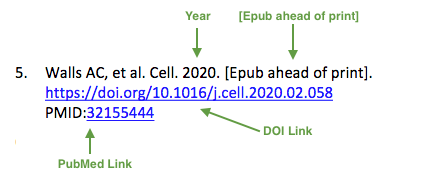
8.4.2. There can be references to the articles which have been published “ahead of print”. The format of citation data for such articles is as follows: JournalTitle. year. [Epub ahead of print]. DOI [PubMed]
Check that there is a period (.) after year followed by a space.
Check that there is a period (.) after “[Epub ahead of print]” followed by a space.
Check that “[Epub ahead of print]” appears after year and before DOI.
If you come across an Epub reference, be sure to verify whether publishing information has since been released. If publishing information is available, then please add vol, pg numbers, etc. and format as directed above in section 8.4.1.
8.5. General Checks
8.5.1. Check for duplicates in the reference list.
If you find duplicate references, please contact author and ask to correct the reference list along with renumbering reference call-outs.
8.5.2. Check for references containing journal title in English and original language (e.g. “International journal of cancer” and “Journal international du cancer”). Remove title in original language and leave English version. If there is just a “foreign language” version present, it is OK to leave that version (no need to find English one). Consult PubMed if in doubt of the correct journal name.
8.5.3. Check for extra information in the references (i.e. in addition to “standard” information). Remove all extra information.
Example:“:official publication of the society of…”
8.5.4. Remove any instances of “Available from”, “[Internet]”, “[pii]” accessed dates (ex: “Accessed November 6, 2017.”) and empty (blank) doi.
8.5.5. Remove “PMCID” details, if present in any reference.
8.5.6. Check formatting for references that have been cited from supplemental issues. This information should appear in between the publishing year and semicolon in this format:
(Suppl N) (where “N” is the supplemental issue number)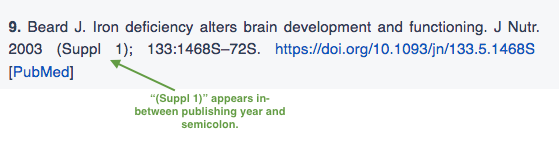
8.5.7. Preprint articles are allowed in references. A couple of examples (not limited to) would be from sources such as BioRxiv and Preprints.
These should be formatted to the same standards as described above in 8.1, 8.2 and 8.4 with the exception that a special ID number will typically be used in place of volume and page numbers.
8.5.8. We prefer all non-journal article references to have a working link when possible. When links are missing, it is fine to search the internet and add if you are sure it is correct; however, it is not necessary to contact the author to provide missing links except where specifically noted to do so in these standards.
8.6. Websites
8.6.1. There is no standard for website references. Authors are allowed to accompany a web link with any information they think appropriate.
8.6.2. Check that website link is valid (i.e. it points to the referenced web resources, rather to error or other irrelevant page).
If the link is not valid, please contact author to provide a working link.
8.6.3. If a link is not present, search the internet and add it if you are sure it is correct. Otherwise leave as-is; it is not necessary to contact author to provide missing links.
8.7. Books and Reports
8.7.1. There is no standard for books and reports. However at least Title and Year (and author name for book references) should be present.
8.7.2. If a link is not present, search the internet and add it (preferably a DOI) if you are sure it is correct. Otherwise leave as-is; it is not necessary to contact author to provide missing links.
9. Corresponding Author and Affiliation
Corresponding author and affiliation can be found at the end of the article right after the References section.
9.1. Check that full name of corresponding author is formatted in bold and underlined font and is followed by colon (:) (only one corresponding author is allowed in PDF).
9.2. Check that author’s name does NOT contain titles and/or degrees (e.g. Dr., Ph.D., M.D., etc.).
9.3. Check that author’s name completely matches corresponding name in the author list (including the middle initials if any).
9.4. Check that full name of corresponding author is followed by affiliation (only one affiliation is allowed in PDF).
9.5. Check that affiliation is formatted in plain text (no special formatting).
9.6. Check spelling of English words in affiliation.
9.7. Check that there are NO street addresses and house numbers included in affiliation.
9.8. Check that country and city names are present in affiliation. State is also required and should be abbreviated in U.S. affiliations.
9.9. Check that country and city names are NOT written in ALL CAPS (capital letters).
9.10. Check that one of the allowed variations for China, Taiwan and Hong Kong are used if present.
9.11. Chinese affiliations: zip code is allowed for both city and county/district. If zip code is present, it must be positioned after city/county/district and there must be no comma between city/county/district and zip code. Zip code is optional for any of the elements (city/county/district).
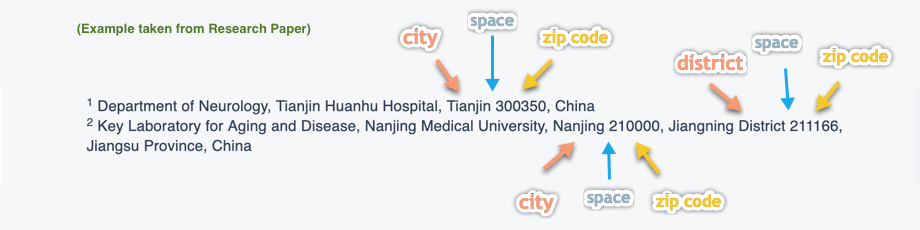
9.12. USA affiliations: check that there is no comma between state and zip code. State must be positioned before zip code. Zip code must be present.
9.13. Non-USA affiliations: check that there is no comma between city and zip code. City must be positioned before zip code. Zip code is optional.
9.14. Check that only commas are used to separate parts of affiliations (i.e. department, institution, etc.).
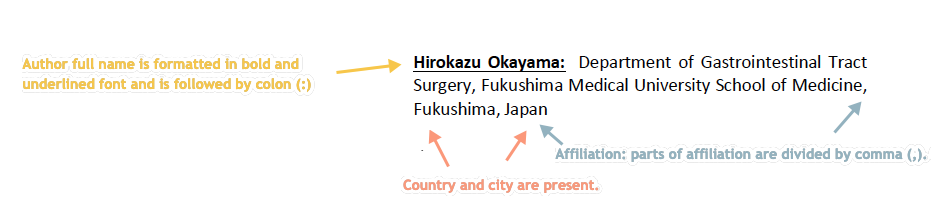
9.15. Check that affiliation generally maintains a hierarchical order from the smallest to largest unit.
Here is a broad guide that shows the hierarchical order of many types of information you may see where information inside the brackets could appear in any order within that bracket:
[Group/Network/Organization], [Laboratory/Section/Division/Unit/Department], [Hospital/Program], [Faculty of…/School of…/Institute of…], [Campus], [University/Agency], [City], [State/Province] [Zip], [Country]
If you find deviations from this order check PubMed to see if you can find a few consistent listings of the affiliation in question to help in determining if an edit may be necessary.
Please provide your suggested edits to the author for approval before making any changes to affiliation order.
9.16. Special Formatting Notes:
Check that “MD” in “MD Anderson Cancer Center” appears as such (not “M D”, “M.D.”, etc..).
10. Correspondence
Correspondence section can be found at the end of the article right after the corresponding author and affiliation section.
10.1. Check that Correspondence section is separated from corresponding author and affiliation section by blank line.
10.2. Check that Correspondence section has a title “Correspondence:” (title case and followed by colon (:)).
10.3. Check that “Correspondence:” is formatted in black, bold and italic font.
10.4. Check that “Correspondence:” is followed by full author name (only one corresponding author is allowed in PDF).
10.5. Check that full author name is formatted in italic font.
10.6. Check that author’s name does NOT contain titles and/or degrees (e.g. Dr., Ph.D., M.D., etc.).
10.7. Check that there are no punctuation marks at the end of correspondence line.
10.8. Check that author’s full name matches the author list (at the top of the paper) and the corresponding author and affiliation section (above).

11. Email
Note
The corresponding author is only allowed one email (mandatory) and one ORCID iD (optional). ORICID iD’s must be accompanied by an email as they are not a substitute for one.
Email section can be found at the end of the article right after the Correspondence section.
11.1. Check that there is no blank line between Correspondence and Email sections.
11.2. Check that email section has a title “Email:” (title case and followed by colon (:)).
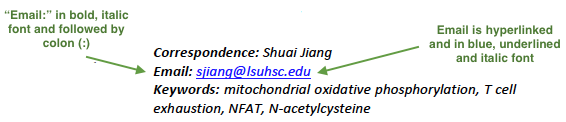
11.3. Check that “Email:” is formatted in black, bold and italic font.
11.4. Check that “Email:” is followed by hyperlinked email address (only one email is allowed in PDF).
11.5. Check that email address is formatted in blue, underlined, italic font.
11.6. Check that ORCID iD (when present) is separated from email address with a comma (,) and a space.
11.7. Check that ORCID iD is hyperlinked and leads to a valid ORCID page.
If ORCID page has “No public information available.”, then ask the author if they can add or make the information visible, and also include a link to the ORCID visibility settings page to assist them in making the update. Inform Olga upon approval if authors do not respond or choose to leave the ORCID as is.
Note
It’s OK to send corrections to production in parallel with the author query for ORCID’s. There is no need to send reminders for pending ORCID queries to authors after approval. Forward any replies received from author after approval to Olga.
11.8. Check that ORCID iD (when present) is formatted in blue, underlined, italic font.
11.9. Check that there are no punctuation marks at the end of email line.
12. Keywords
Keywords section can be found at the end of the article right after the Email section.
12.1. Check that there is no blank line between Email and Keywords sections.
12.2. Check that Keywords section has a title “Keywords:” (title case and followed by colon (:)).
12.3. Check that “Keywords:” is formatted in black, bold and italic font.
12.4. Check that “Keywords:” is followed by at least one keyword. (Note: number of keywords is limited to 8).
12.5. Check that keyword (or list of keywords) is formatted in italic font.
12.6. Check that keywords are written in lowercase, unless proper nouns as well as exceptions such as special terms, genes, proteins, species names etc, which normally start with capital letter. Check that capitalization of scientific terms is correct.
We suggest you use the following procedure if you are in doubt regarding this or that term. If any doubts remain or any keywords are found to be formatted inconsistently throughout the MS when using the previously mentioned procedure, please contact the author.
12.7. Check that there are no punctuation marks at the end of keywords line.

13. Abbreviations
This is an optional section that should appear after Keywords section and before Copyright section. The specific placement of this section should accord with order shown here for Abbreviations through Funding.
When present, Abbreviations section can be found at the end of the article right after the Keywords section.
13.1. Check that there is no blank line between Keywords and Abbreviations sections.
13.2. Check that Abbreviations section has a title “Abbreviations:” (title case and followed by colon (:)).
13.3. Check that “Abbreviations:” is formatted in black, bold and italic font.
13.4. Check that abbreviation (or list of abbreviations) is formatted in italic font.
13.5. Check the format of the abbreviations line:
ABRVTN: expanded text; ABRVTN: expanded text
Check that abbreviation part is separated from expanded part by a colon (:). No other separators allowed.
Check that abbreviation pairs (i.e. abbreviation and corresponding expanded text) are separated from each other by semicolons (;). No other separators allowed.
We suggest you use the following procedure if you are in doubt regarding this or that term. If any doubts remain or any abbreviations are found to be formatted inconsistently throughout the MS when using the previously mentioned procedure, please contact the author.
13.6. Check that there are no punctuation marks at the end of abbreviations line.
14. Acknowledgments
This is an optional section that should appear after Keywords section and before Copyright section. The specific placement of this section should accord with order shown here for Abbreviations through Funding.
14.1. Check that there is no blank line between Acknowledgments and section preceding it.
14.2. Check that Acknowledgments section has a title “Acknowledgments:” (title case and followed by colon (:)).
14.3. Check that “Acknowledgments:” is formatted in black, bold and italic font.
14.4. Check that Acknowledgments information is formatted in italic font.
14.5. Check that there are no punctuation marks at the end of Acknowledgments line.
15. Conflicts of Interest
This is an optional section that should appear after Keywords section and before Copyright section. The specific placement of this section should accord with order shown here for Abbreviations through Funding.
15.1. Check that there is no blank line between Conflicts of Interest and section preceding it.
15.2. Check that Conflicts of Interest section has a title “Conflicts of Interest:” (title case and followed by colon (:)).
15.3. Check that “Conflicts of Interest:” is formatted in black, bold and italic font.
15.4. Check that Conflicts of Interest information is formatted in italic font.
15.5. Check that there are no punctuation marks at the end of Conflicts of Interest line.
16. Funding
This is an optional section that should appear after Keywords section and before Copyright section. The specific placement of this section should accord with order shown here for Abbreviations through Funding.
16.1. Check that there is no blank line between Funding and section preceding it.
16.2. Check that Funding section has a title “Funding:” (title case and followed by colon (:)).
16.3. Check that “Funding:” is formatted in black, bold and italic font.
16.4. Check that Funding information is formatted in italic font.
16.5. Check that there are no punctuation marks at the end of Funding line.
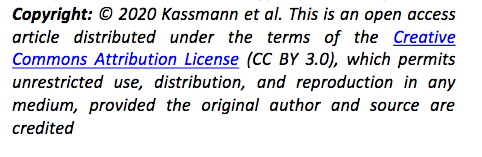
17. Copyright
Copyright section can be found at the end of the article right after the Keywords section (or last optional section, if present).
17.1. Check that there is no blank line between Copyright and section preceding it.
17.2. Check that Copyright section has a title “Copyright:” (title case and followed by colon (:)).
17.3. Check that “Copyright:” is formatted in black, bold and italic font.
17.4. Check that copyright string starts with copyright symbol (©) and is followed by a YEAR.
17.5. Check that the YEAR is followed by one of the following options:
single author surname followed by period (.) [in case where paper has only one author]
2 author surnames divided by “and” and followed by period (.) [in case where paper has 2 authors]
one author surname followed by et al. [in case where paper has more than 2 authors]
17.6. Check that author surname (or list of surnames) is formatted in italic font.
17.7. Check that author surname name (or list of surnames) is followed by the following statement:
This is an open access article distributed under the terms of the Creative Commons Attribution License (CC BY 3.0), which permits unrestricted use, distribution, and reproduction in any medium, provided the original author and source are credited
17.8. Check that there are no punctuation marks at the end of copyright line.
17.9. Check that last name of first author matches last name of the first author in the author list. In case of 2 authors, check that last names match names in the author list.
17.10. Check that “Creative Commons Attribution License” is a working hyperlink that leads to https://creativecommons.org/licenses/by/3.0/.
18. Dates
Note
Published date will only be present for Advance papers.
Dates section can be found at the end of the article right after the Copyright section.
18.1. Check that dates section is separated from Copyright section by blank line.
18.2. Check that “Received:” and “Published:” titles are title case and followed by colon (:).
18.3. Check that “Received:” and “Published:” titles are formatted in black and bold font.
18.4. Check that “Received:” and “Published:” titles are followed by a date.
18.5. Check that month is spelled out as a word and dates are in-line with the following format: Month Day, Year (e.g. June 1, 2017, April 12, 2016, December 31, 2015, etc.) Note: if a day is presented by single digit, there should be no leading 0.
18.6. Check that there are no punctuation marks at the end of received and published date lines.

18.7. Check that Received date matches JPS.
