WORD DOC: All Papers (except Editorials)
The Word doc can be downloaded by clicking the “Download manuscript” button in the Aging PubMed Team Console.
Request MS from Alex and Christopher if one is unavailable.
Important
Open the Word doc with Microsoft Word (other word processors such as Google Docs and Apple Pages do not reliably render the correct font) and with the spelling and grammar checker enabled.
Word docs can be uploaded to the team Google Drive if necessary, but it would not be advisable to open them there as the font will be permanently corrupted if saved as a Google Doc, which could be done inadvertently due to Google’s auto-save feature.
1. Spelling
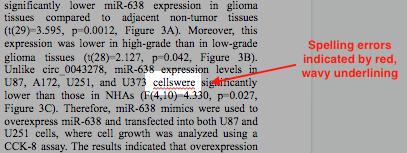
1.1. Check for spelling errors presented by spelling checker.
These are indicated by red, wavy underlining.
2. Grammar
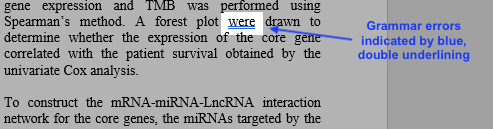
2.1. Check for grammar errors presented by grammar checker.
These are indicated by with blue, double underlining.
3. Font
3.1. Report any corrupted or incorrect font that you notice while checking spelling and grammar as a correction to production.
Note
We report these errors because the final PDF is directly generated from the Word doc. Still report these issues even if there is not an evident effect in the current PDF so as to avoid any potential future issues.
We only use Times New Roman and Calibri fonts:
Section
Font
Blue Banner/Rubric
Calibri
Paper Type
Times New Roman
Title–Copyright
Calibri
Section Headers/Titles
Times New Roman
Abstract Text
Calibri
Body Text
Times New Roman
Page Footers
Calibri
Table Headings
Calibri
Table Text
Times New Roman
Table Notes
Calibri
Figure Legends
Calibri
References Text
Calibri
Suppl Headers
Times New Roman
“Please browse Full Text…” Callout
Times New Roman
Suppl Fig Legends
Calibri
Suppl Table Heading
Calibri
Supp Table Text
Times New Roman
Suppl Table Notes
Calibri
Suppl Materials Section Headers/Titles
Times New Roman
Suppl Materials and Methods Text
Times New Roman
Suppl Refs
Calibri