SUPPLEMENTARY MATERIALS: All Papers (except Editorials)
Note
Supplementary materials are located in two places:
HTML page (after Materials and Methods section) - All supplementary materials are available here as separate downloads.
PDF of the main manuscript (after References) - All supplementary materials that can be placed in a PDF are available here. Any materials that cannot fit in PDF due to formatting or size will have callouts to the HTML where they can be downloaded and viewed.
This check is for the supplementary materials downloads in HTML. Checks for supplementary materials in the PDF can be found here.
Important
General formatting that does not accord with our standards for figure legends and table titles/notes sections can be overlooked (where the discrepancies are chronic) for files of supplementary figures and tables that exceed an average combined total of about 10 pages.
Examples of things we can overlook would be justified legends/notes sections, keeping certain text in bold, punctuation for figure and table names and placement of figure legends before the figure instead of after.
Check each supplementary file to verify contents. Google Drive and VLC are alternative methods to open supplementary videos if you’re having trouble opening with your pre-installed video player.
1. Title
The titles of each supplementary PDF file will vary depending on their contents. Please see all possible variations below. No other variations allowed.
Each supplementary PDF file should have a heading; seek guidance from both Olga and Elena while copying Christopher in your corrections email if a heading is missing.
1.1. Supplementary Figures
When multiple figures are contained in a PDF, title should be SUPPLEMENTARY FIGURES - ALL CAPS, blue and bold font.

When a single figure is contained in a PDF, title should be SUPPLEMENTARY FIGURE - ALL CAPS, blue and bold font.

1.2. Supplementary Tables
When multiple tables are contained in a PDF, title should be SUPPLEMENTARY TABLES - ALL CAPS, blue and bold font.

When a single table is contained in a PDF, title should be SUPPLEMENTARY TABLE - ALL CAPS, blue and bold font.

1.3. Supplementary References
Title should be SUPPLEMENTARY REFERENCES - ALL CAPS, blue and bold font.

1.4. Supplementary Materials
Title should be SUPPLEMENTARY MATERIALS - ALL CAPS, blue and bold font.


3. Text
3.1. Check that font face and size is used consistently throughout the supplementary file(s).
3.2. Check that there are no blank pages (i.e. all the pages have content).
3.3. Check for spelling errors using downloadable Word doc that is described in 12.2.
4. Figures
Note
Figures can appear in one file or in separate files (regardless of size).
Acceptable file format for figure presentation is PDF.
Acceptable file formats when requesting an updated figure from author are TIFF (preferable), PNG, JPG (not recommended) or EPS format and at no less than 300 ppi.
Any additions or changes outside of spelling, grammar or resolution to the figures need approval from Olga or Elena before implementation.
4.1. HTML Figures checks from 13.1. to 13.4 (inclusive) are applicable to supplementary figures with one exclusion: instead of Figure N, figure legends should be named as Supplementary Figure N.
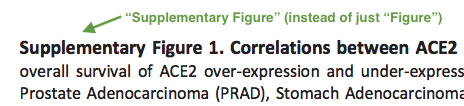
4.2. HTML Figures checks from 13.5 (inclusive) are applicable to supplementary figure callouts with one exclusion: instead of Figure N, callouts should appear as Supplementary Figure N.

5. Tables
Important
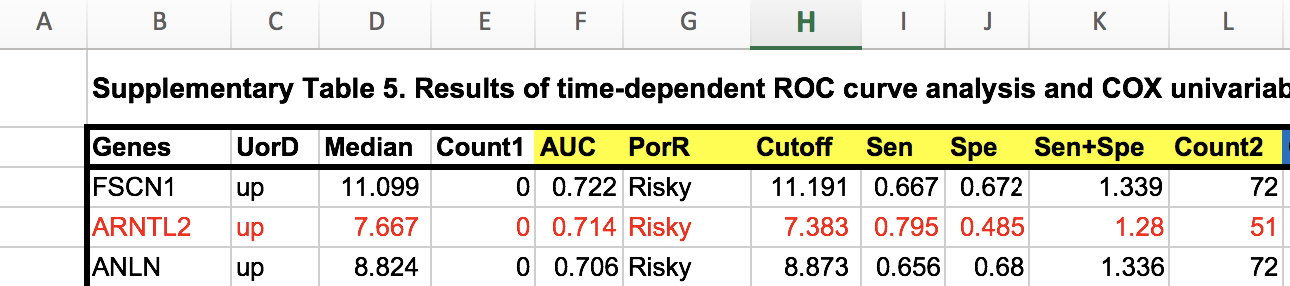
If table spans across 3 or more pages, then it is considered a “large table”. For large table handling instructions, check here.
Note
Tables can appear in one file or in separate files (regardless of size). Text (.txt) files will only open as an HTML page. This is OK.
Acceptable file formats for table presentation are PDF, Excel, Word and CSV.
We are flexible on Text (.txt) file format. Email the author letting them know we typically publish as Excel or Word, and ask if there is a specific reason they prefer to keep as Text. If they come back with a reason, then we can allow it.
Raise inquiry to Olga and Christopher about any formats that you may come across that are not mentioned above.
Acceptable file formats when requesting an updated table from author are Excel (preferable), Word and CSV. Flexibility for Text files is the same as mentioned in above paragraph.
Any additions or changes outside of spelling or grammar to the tables need approval from Olga or Elena before implementation.
5.1. HTML Tables checks from 14.1. to 14.5 (inclusive) are applicable to supplementary tables with one exclusion: instead of Table N, tables should be named as Supplementary Table N.
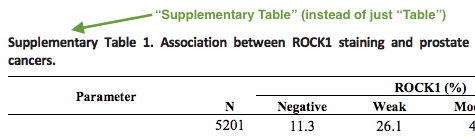
5.2. HTML Tables checks from 14.6 (inclusive) are applicable to supplementary table callouts with one exclusion: instead of Table N, callouts should appear as Supplementary Table N.

6. References
Note
Supplementary references should be kept inside the file that they are cited in. If they are being cited in more than one file, then they should be kept in their own file.
6.1. References should be checked in accordance with PDF References checks.
The supplementary materials must have its own reference list (separate from the reference list in the main manuscript) when references are being called out there.
If you notice that references are being called out in the supplementary materials but there is no supplementary reference list present, then please contact the author to provide one. On the other hand, if there is a reference list but no callouts to it in the supplementary materials, then please contact the author to provide updated supplementary materials with added callouts.
6.2. Supplementary reference callouts should be checked in accordance with PDF References Callouts checks.
7. Large Tables
Tables which fit into 2 pages are “normal tables” and should be published as PDF for convenient printing. Tables which span across 3 or more pages are considered “large tables”. Large tables should be published as separate supplementary files (preferably in Excel (.xlsx) format).
7.1. Check whether large table was supplied by the author in PDF format. If so, then please contact the author and ask to provide tables in Excel (.xlsx) or Word (.docx) format. Excel (.xlsx) format is preferable.
7.2. Check whether large table was supplied by the author in Word (.docx) format. If so, check whether large table contains complex formatting (e.g. nested cells, subcategories etc) which is likely to be disturbed by conversion to Excel (.xlsx).
If conversion to Excel (.xlsx) is feasible, ask Production team to convert the large table in the Word (.docx) format to Excel (.xlsx) format.
If conversion to Excel (.xlsx) is not feasible, then such large table is to be published as a separate Word (.docx) supplementary file.
7.3. Check that tables in Excel or Word format have table number and header compliant to HTML Tables check 14.2.